
Authentication records that you have validated a trading partner’s Authorized Trading Partner (ATP) status. Authenticated records show a green badge; records that have not been validated show a red Pending or Not Verified badge. You can authenticate contacts, organizations, and licenses.
How authentication works #
Some validations happen automatically. A partner who presents a verified credential is marked as Verified, and enterprise customers can enable automatic domain whitelist and state license checks. You can also authenticate a record manually, in line with your own Standard Operating Procedures (SOPs).
Authenticate a record #
- Open the profile of the contact, organization, or license you want to authenticate.
- Click Update authentication.
- Enter a note describing how you validated the partner’s ATP status, for example the SOP you followed.
- Save your changes.
The record is marked as Verified, your note is saved to its authentication history, and an expiry date is set.
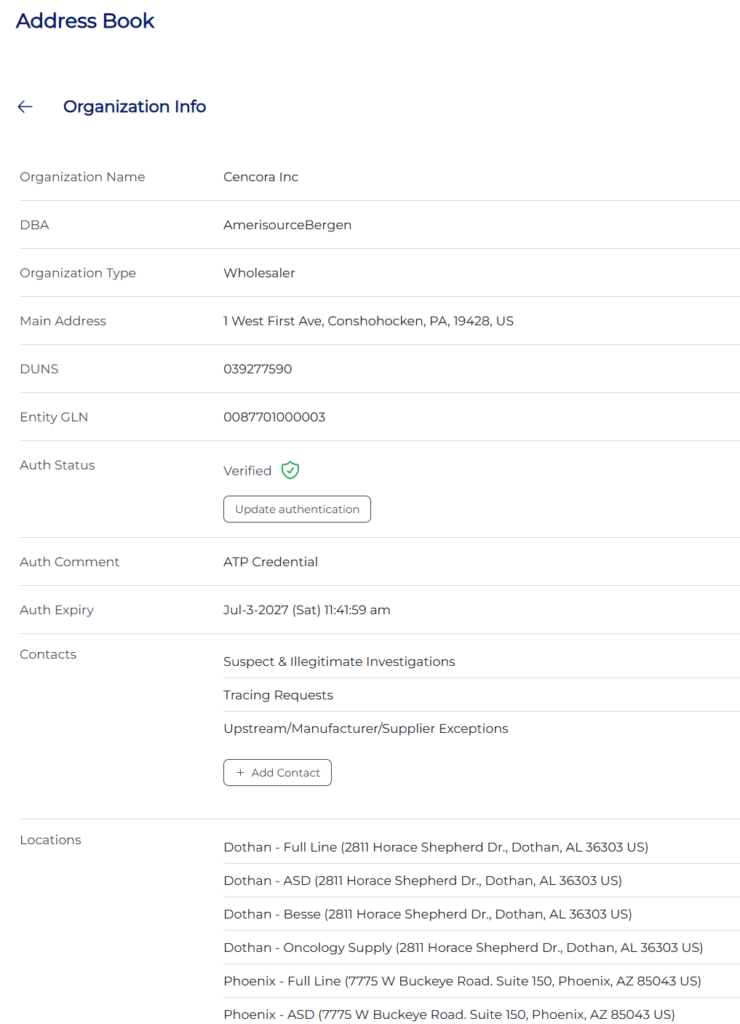
Organizations and licenses are authenticated in exactly the same way, each from its own profile.
Authentication expiry #
The default authorization period is one year, after which you should re-validate the record. The expiry period can be adjusted.
Note: Manual authentication should always follow your organization’s documented SOPs for validating ATP status.
Last updated
Ready to do this live?
See the Address Book and DSCSA workflows on your own data.